
Statistics.gov.scot improvement project: alpha user research report
Research to improve Scottish Government’s site for open access to Scotland’s official statistics: statistics.gov.scot by assessing current and potential users through testing redesigned portal prototypes and publishing platforms. This user research is part of the alpha project to enhance the service
User testing: Round 2
Purpose and setup
The broad purpose of the second round of user testing was to test updated versions of the initial prototypes, with a specific focus on accessibility testing with disabled users (who may or may not use assistive technologies to access the web). Again, testing was largely task-based. Results of the tests informed an updated user needs catalogue (seem Appendix C) and a high-level user requirements catalogue.
Versions of Cobalt and Emerald were iterated and deployed for testing, while CKAN Admin was replaced by a new data publishing platform prototype, Workflow Manager. While data publishers saw CKAN Admin as an improvement over the current admin system, there was some concern that it may not be the best option to meet the future needs and objectives of the Open Data Team and wider data communities, hence the decision to test a new prototype (based on research to date).
Workflow Manager had a somewhat novel journey from ideation to testing, being designed and developed using Figma Make, which is a relatively new AI-powered prototyping tool. Briefly, the Open Data Team had been discussing the possibility of prototyping and testing a bespoke solution (i.e. not an existing solution such as CKAN or PxStat admin) for managing the various tasks associated with publishing data to the Open Data Portal. This prompted a rough journey and feature mapping exercise and an action to create a basic prototype to potentially test with data publishers instead of CKAN Admin in Round 2. With some experience in prototyping, the user researcher (also the author of this report) had intended to create a basic design using Figma but, upon opening the software, noticed the new Figma Make feature. Within a few prompts, the tool had designed, coded, and published a surprisingly advanced front-end prototype, which broadly aligned with the journeys and included the features discussed by the team just a few days earlier. For testing purposes this was named Workflow Manager (later known as ‘Jade’).
Leading up to testing, the team rapidly iterated upon the front-end Workflow Manager prototype to better meet the data publisher needs generated through Discovery and Alpha research up to that point. Although the prototype did not strictly adhere to the Scottish Government Design System, it was ultimately deemed fit for testing with data publishers.
Usability session scripts for Round 2 were adapted from Round 1 scripts. While the journeys were broadly similar, some changes were required to make the scripts suitable for testing with disabled users and users of assistive technologies, and to better suit the new Workflow Manager prototype. Journeys were first tested on each prototype by the team, with any obvious blockers or missing details addressed prior to testing with users. The full Round 2 scripts are available in Appendix B (following the Round 1 scripts).
Participation and testing
10 people were recruited for and participated in Round 2 of testing. General citizens (2), inquiring citizens (2), and commercial users (2) were recruited by an external recruitment agency. In order to more fully test the accessibility of Cobalt and Emerald, the brief for the external recruiter specified that all of these participants should identify as having one or more accessibility requirements based on the following:
- Cognitive impairment (e.g. dyslexia).
- Motor impairment (e.g. paralysis, muscular dystrophy).
- Visual impairment.
- Deafness or hearing loss.
- Neurodiversity (e.g. ADHD, autism).
Descriptions of disability or impairment, and any assistive technology (if used) are below, although most details are removed to prevent identification. Broadly, the below participants were all based in Scotland and aged between 30 and 50.
| P# | User group | Gender | Disability or impairment (self-described) | Assistive technology |
|---|---|---|---|---|
| P024 | Commercial user | F | Neurodivergent; ADHD | n/a |
| P025 | Commercial user | M | Visually impaired; registered Blind | Screenreader |
| P026 | General citizen | M | Neurodivergent; dyslexic | n/a |
| P027 | Inquiring citizen | F | Visually impaired; registered Blind | Screenreader |
| P028 | Inquiring citizen | M | Neurodivergent; ADHD, Autistic. | n/a |
| P029 | General citizen | M | Mobility, limited dexterity; Cerebral Palsy | Speech to text software |
Data publishers (4) were recruited by the Open Data Team from details gathered during Round 1. Given the focus on accessibility and the challenges already experienced with advanced features during Round 1 of testing, the team were confident that there was little to no benefit of recruiting technical/expert users for Round 2. The team were similarly confident that there was little to no benefit of specifically recruiting public sector/policy influencers for Round 2 of testing, given the similarity of findings related to these users and the citizen and commercial groups in Round 1, and the similarity of their wider knowledge and experience to the data publishers group.
Data publishers tested Workflow Manager, while all other participants were assigned to either Cobalt (3 participants) or Emerald (3 participants) on an alternating basis within their user group. Again, for Round 2 there were fewer sessions than the maximum initially proposed (16, which had included technical/expert and public sector/policy influencers), but the team was satisfied with the range of users and the depth of testing.
Usability and testing sessions were run from 08/07/25 to 15/07/25, all online using Microsoft Teams. The sessions were led by Tom Farrington (user researcher, Storm ID), with note-taking and observational support from the SG Open Data Team and four members of the wider SG data community. In addition to the participant and researcher, no more than two notetakers/observers were permitted for each session.
Qualitative data was generated in the form of notes typed by project team members into a secure Confluence Whiteboard, and audio and video recording within Teams. This data was subject to a basic qualitative content analysis by the facilitator, being a version of template analysis as described in the Methodology section.
Quantitative data was generated through the administration (towards the end of each session) of a questionnaire containing the SUS. This was subject to a statistical analysis using the SUS Analysis Toolkit.
Round 2 interim findings
The following findings are interim in the sense of being produced immediately after Round 2 of usability testing, before an overall analysis of both rounds of testing. These are primarily designed to summarise the experiences of Round 2 participants to highlight any potential adjustments, with a particular focus on improving accessibility.
Language and labelling should be meaningful (all platforms)
- “I’d dive straight into themes, thinking about demographics…could be more information on ‘Organisations’…I wouldn’t know what that means, necessarily” (P024)
- “Open Data Scotland have links through to ‘what is open data?’… there could be a glossary of terms like this” (P024)
- “Selecting dimensions? No idea.” (P028)
- “I’d be doing an eye-roll if I saw the long description - I need a TL;DR version.” (P028)
- “With tags I was waiting for a dropdown” (P030)
- “Would be useful to have a glossary” (P031)
Plain-English labels and explanations of each at the point of use (e.g. an inline glossary) would reduce hesitation and misinterpretation.
Accessibility issues can make core tasks tricky (Cobalt/Emerald)
- “Straight away NVDA [screenreader] is recognising the main heading as a landmark rather than h1” (P025)
- “You could have a high contrast mode” (P025)
- “Search should be a heading, although I’d probably still look for it, I’d be annoyed it wasn’t a heading…skipping by heading is so much easier” (P027)
- “Search is level 3, and filters are level 3. Make the search heading level 2.” (P025)
- “[Dataset Analysis modal] I use my scroll wheel to scroll down [accidentally zooms in on chart]… I’d freak out and think this wasn’t for me!” (P024)
Fixing heading levels, focus order, and contrast ratios, and ensuring modals/updates are announced will unblock assistive-tech users. More intuitive visualisation tools will help for all sighted users.
High expectations for search and filtering (Cobalt/Emerald)
- “I want the search to be like Google” (P024)
- “that’s quite a lot of categories! So I might use the filter to bunch some together, otherwise I’d have to scroll down loads” (P024)
- “search can be the most inaccessible part of websites” (P025)
- “first instinct is to use the search tool” (P026)
- “I’d like to search by postcode” (P027)
- “my personal preference is a good search bar” (P028)
Regarding search, participants expect autocomplete, suggestions, and fuzzy search. Filtering should be intuitive and relevant. Both should be fully accessible.
Preview, visualise and download (Cobalt/Emerald)
- “Data preview is what I would expect” (P022)
- “I’d expect a better preview of how it would look - exactly how the website would look to someone going to it” (P023)
- “Would be good to have preview [chart and/or table] as well as [ability to] build it yourself.” (P029)
A default, ready-made preview (and simple chart) reassures users and helps them verify they’re in the right place before trying any more involved chart or table-building.
Help and contact journeys should be unambiguous and intuitive (Cobalt/Emerald)
- “Help - I would hope you could type in a keyword or queries to get answers - more of a search engine” (P022)
- “contact and help are in the expected places” (P026)
- “metadata is useful but I find it odd that it’s got a contact email address lumped in with that” (P026)
- “is that a contact for someone to do with the person who collates the stats or a contact for the person from within the dept who produced the stats” (P028)
- “[on contact us form] - this is fantastic!” (P028)
Participants value clear obvious routes to contact the right person, plus searchable help.
Clear orientation, status language and safer publishing (Workflow Manager)
- “starting a new workflow seems to be missing” (P030)
- “might be useful to have a welcome message, could be more reassuring” (P031)
- “Not a massive fan of the ‘start time’…'running' doesn’t tell you why it’s running.” (P022)
- “it’s good that it says when it was last run” (P023)
- “does last run mean successful? Or could this be unsuccessful?” (P031)
- “I’d be very cautious about publishing without any checks!” (P022)
- “Don’t feel comfortable publishing, I could accidentally click that.” (P023)
- “Add a ‘take me to my new dataset’ so I can admire it…I would expect to be instantly taken to the dataset page at the end - that would completely reassure me.” (P030)
A first-run welcome, clarification of status terms (e.g. duration, start time, last run), and confirm-to-publish or staging area would reduce uncertainty.
Team collaboration and provenance are expected (Workflow Manager)
- “I’d hope you could send people in your team datasets locally for internal checking” (P022)
- “I really like the assign workflow for review” (P030)
- “we QA everything before uploading it to the platform” (P023)
Participants want to assign for review, see who did what, and keep a lightweight audit trail alongside the run.
File requirements should be seen earlier (Workflow Manager)
- “file requirements should be further up so you can see them before you click select file” (P022)
- “I didn’t actually see the File Requirements…but I’d only look at that if it didn’t work” (P023)
Moving requirements above file selection would make this clearer.
General preferences (Cobalt/Emerald/Workflow Manager)
Based on R2 qualitative data alone, most participants reacted more positively to Cobalt than to Emerald, and data publishers found that Workflow Manager exceeded their expectations for a publishing platform (whilst accepting that this was a front-end only prototype).
System Usability Scale (R2)
As in Round 1, responses to the SUS were gathered from the 10 participants in the final minutes of each testing session, as required to gather their immediate reflections on the system just used. 3 participants assessed Cobalt, 3 assessed Emerald, and 4 assessed Workflow Manager. Cobalt and Emerald SUS scores from Round 2 were combined with Round 1 SUS scores to give higher conclusiveness for both, 100% for Cobalt (12 responses) and 78% for Emerald (9 responses). Analysis for Workflow Manager is inconclusive (0%).
This is plotted below along with all data points, showing a higher score (76.04) and lower SD (13.67) for Cobalt than Emerald (64.44 and 25.67 respectively). The highest score (81.25) and lowest SD (11.27) is for Workflow Manager, although again this is based on only 4 responses.
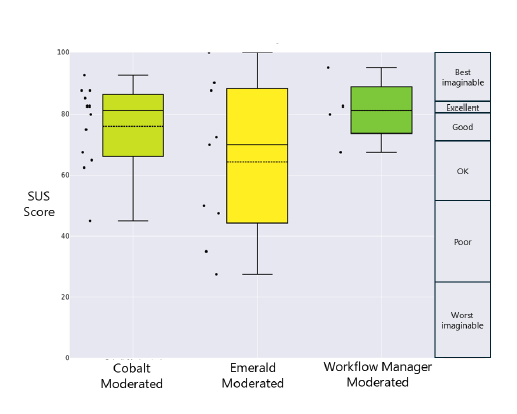
With the caveat that we only had 4 responses regarding Workflow Manager, the following table offers more detail on the usability of each system, relative to each other and various established scales:
| System | Cobalt Moderated | Emerald Moderated | Workflow Manager Moderated |
|---|---|---|---|
| SUS Score (mean) | 76.04 | 64.44 | 81.25 |
| SD | 13.67 | 25.67 | 11.27 |
| Min | 45 | 27.5 | 67.5 |
| Max | 92.5 | 100 | 95 |
| Adjective Scale | Good | OK | Excellent |
| Grade Scale | B | C | A |
| Quartile Scale | 3rd | 2nd | 4th |
| Acceptability Scale | Acceptable | Marginal | Acceptable |
| NPS Scale | Passive | Passive | Promoter |
| Industry Benchmark | Above Average | Below Average | Above Industry Standard |
Moderated and unmoderated SUS scores
As of 05/08/25, we received 13 unmoderated responses to the Emerald questionnaire, and 8 unmoderated responses to the Cobalt questionnaire. This indicates 100% conclusiveness for Emerald, and 75% for Cobalt. Qualitative data was also generated through this survey method, and analysed in accordance with the existing qualitative data.
The plot below shows the moderated and unmoderated SUS scores for Cobalt and Emerald, showing generally higher scores for Cobalt, with a much lower SD.
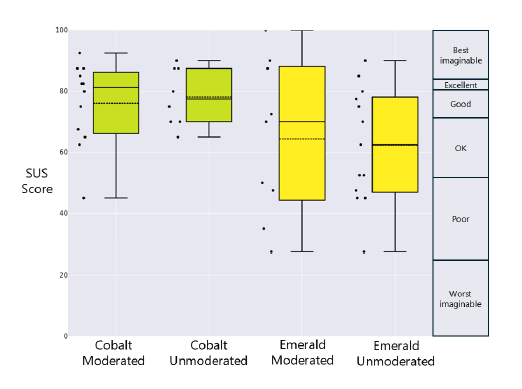
The following table offers more detail on the usability of each system, relative to each other and various established scales:
| System | Cobalt Moderated | Cobalt Unmoderated | Emerald Moderated | Emerald Unmoderated |
|---|---|---|---|---|
| SUS Score (mean) | 76.04 | 78.12 | 64.44 | 62.31 |
| SD | 13.67 | 9.52 | 25.67 | 18.86 |
| Min | 45 | 65 | 27.5 | 27.5 |
| Max | 92.5 | 90 | 100 | 90 |
| Adjective Scale | Good | Good | OK | OK |
| Grade Scale | B | B | C | D |
| Quartile Scale | 3rd | 4th | 2nd | 1st |
| Acceptability Scale | Acceptable | Acceptable | Marginal | Marginal |
| NPS Scale | Passive | Passive | Passive | Detractor |
| Industry Benchmark | Above Average | Above Average | Below Average | Below Average |
It is important to note that a SUS score is not a percentage in itself, e.g. a SUS score of 68 is at the 50th percentile, meaning the system is perceived as having an average usability score. The following percentile curve illustrates this point, while also clearly illustrating the relative closeness of unmoderated and moderated scores for each prototype.
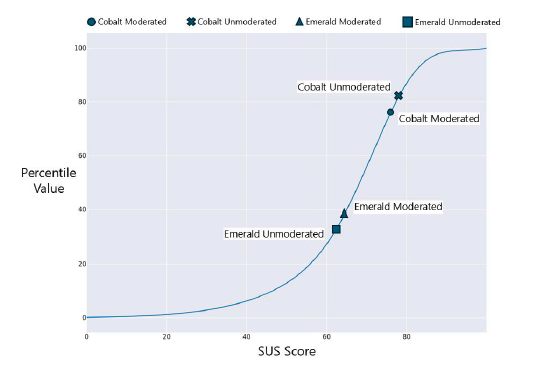
According to both moderated and unmoderated responses, this roughly places Emerald in the bottom 40% of SUS scores, and Cobalt in the top 25% of SUS scores.
Combined SUS scores
Given the relative closeness of the moderated and unmoderated scores, it is interesting to look at the combined scores, to gain an overall sense of perceived usability. These offer 100% conclusiveness for both scores, and (perhaps unsurprisingly) show a higher score (76.88) and lower SD (11.94) for Cobalt than for Emerald (63.18 and 21.34 respectively). These are plotted below:
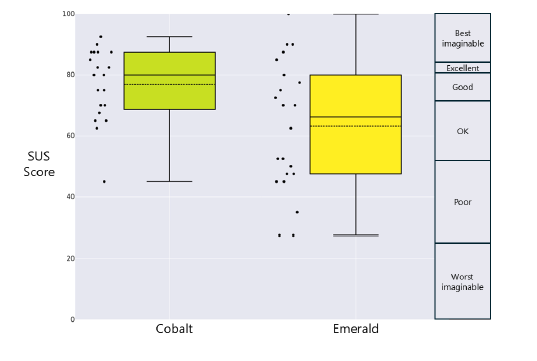
The following table offers more detail on the usability of each system, relative to each other and various established scales:
| System | Cobalt | Emerald |
|---|---|---|
| SUS Score (mean) | 76.88 | 63.18 |
| SD | 11.94 | 21.34 |
| Min | 45 | 27.5 |
| Max | 92.5 | 100 |
| Adjective Scale | Good | OK |
| Grade Scale | B | C |
| Quartile Scale | 3rd | 2nd |
| Acceptability Scale | Acceptable | Marginal |
| NPS Scale | Passive | Passive |
| Industry Benchmark | Above Average | Below Average |
Analysis of the combined quantitative data places Cobalt’s score in the top 21% of SUS scores, and Emerald’s score in the bottom 35% of SUS scores. The perceived usability of Cobalt thus exceeds our minimum benchmark SUS score of 74.
Qualitative data from unmoderated survey
Along with the SUS and optional demographic data, the unmoderated surveys generated qualitative (free text) responses to two questions:
- Please briefly outline how you used the website.
- Please note any feedback or suggestions for improving the website.
Again, these are completed after attempting to find data on the relevant prototype. This small quantity of qualitative data was analysed using the templates generated through analyses of user testing session data. This analysis confirms the findings from the earlier analyses, as well as the overall findings, and is summarised here for completeness:
- Participants expressed a strong relative preference for Cobalt over the current site and Emerald (evidently some had used both).
- Search needs to be typo-tolerant and fuzzy; filtering needs to be intuitive.
- Metadata, including licensing information, is valuable to participants and should be easy to find.
- Visualisation and table-building tools are generally desirable but awkward to use on both prototypes.
The above analyses and findings were reviewed and discussed by the project team, before being combined to generate the Overall findings, needs, and recommendations. These findings were then presented to the wider SG data division. Feedback from this presentation was incorporated into the first draft of this report, which was then circulated to the project team for feedback. Feedback on the draft largely related to structure and clarity, and has been incorporated into this final version.
Appendices A-C now follow, respectively presenting the user journeys considered for testing, the scripts used for testing, and the resulting catalogue of user needs.
Contact
Email: auren.clarke@gov.scot