
Statistics.gov.scot improvement project: alpha user research report
Research to improve Scottish Government’s site for open access to Scotland’s official statistics: statistics.gov.scot by assessing current and potential users through testing redesigned portal prototypes and publishing platforms. This user research is part of the alpha project to enhance the service
User testing: Round 1
Purpose and setup
The broad purpose of the first round of user testing was to test prototypes that had been developed to address issues with and improve upon the current service. Testing was largely task-based. Results of the tests then informed potential refinements and areas for further exploration during the second round of testing, and fed into requirements and development in the Technology workstream.
Two open data portals (named Cobalt and Emerald) and one data publishing tool (CKAN Admin) were prototyped and deployed for the first round of user testing. Cobalt and Emerald were designed and developed from scratch, using existing open-source data management systems that were identified during Discovery, respectively CKAN and PxStat, modified based on the Discovery findings, and with front-ends customised in alignment with the Scottish Government Design System. For clarity, the two Open Data Portals were a combination of 1. CKAN plus Cobalt and 2. PxStat plus Emerald. Data publishers only saw CKAN, while all other users only saw Cobalt and Emerald.
Cobalt and Admin were populated with around a dozen example datasets, and made publicly available for testing. CKAN Admin was a largely unaltered deployment of the standard CKAN backend, which fed through to the Cobalt prototype. The UI for CKAN Admin is out-of-the-box (i.e. not customised), and was accessible via login details provided to data publisher participants during testing.
Potential journeys for each user group to test each system were discussed and refined by the team prior to testing. These are available in Appendix A. These were tested on each prototype by the team, with any obvious blockers or missing details addressed prior to testing with users. Usability session scripts were then developed for each user group, and discussed and refined by the team. The full scripts for Rounds 1 and 2 of testing are available in Appendix B.
Participation and testing
21 people were recruited for Round 1 of testing. General citizens (2), inquiring citizens (2), and commercial users (2) were recruited by an external recruitment agency. Technical/expert users (4), public sector/policy influencers (4) and data publishers (4) were recruited by the Open Data Team. Data publishers tested CKAN Admin, while all other participants were assigned to either Cobalt (9 participants) or Emerald (8 participants) on an alternating basis within their user group. After two cancellations (a technical expert and a commercial user, both assigned Emerald), 19 people participated in Round 1. Although there were fewer sessions than the maximum initially proposed (24), the team was satisfied with the range of users and depth of testing.
Usability testing sessions were run from 10/06/25 to 26/06/25, all online using Microsoft Teams. The sessions were led by Tom Farrington (user researcher, Storm ID), with note-taking and observational support from the SG Open Data Team and four members of the wider SG Data Division. In addition to the participant and researcher, no more than two notetakers/observers were permitted for each session.
Qualitative data was generated in the form of notes typed by project team members into a secure Confluence Whiteboard, and audio and video recording within Teams. This data was subject to a basic qualitative content analysis by the facilitator, being a version of template analysis as described in the Methodology section.
Quantitative data was generated through the administration (towards the end of each session) of a questionnaire containing the SUS. This was subject to a basic statistical analysis using the SUS Analysis Toolkit.
Round 1 interim findings
The following findings are interim in the sense of being produced immediately after Round 1 of usability testing, before the remaining programme of research. These are primarily designed to summarise the experiences of Round 1 participants while pointing towards potential improvements and area for further exploration during Round 2 of testing.
Participants tend to search and filter first - this needs to work well (Cobalt/Emerald)
- “I would try search first.” (P009)
- “no autocomplete - would expect this.” (P008)
- “I'm quite disappointed with those results.” (P020)
- “clear filters removes even the search term not just the filters.” (P021)
- “Search bar if you had something in mind, or [browse by] a theme if you wanted to explore.” (P017)
Auto-complete and suggestions, support for searching by synonyms, and more intuitive filters that can be cleared without clearing the search results were requested by participants.
Language and labelling should be meaningful (Cobalt/Emerald/CKAN Admin)
- “Why are we introducing new phrases [DateCode, FeatureCode]...why are we not just calling things what they are?” (P006)
- “the labels aren't very clear - what is it measuring?” (P013)
- “If the labels are intuitive, then I'd just dive right in. Easy!” (P019)
- “I don't know what FeatureCode is - that's just a serial number to me.” (P017)
- “What does 'type override' mean?” (P004)
Unclear dimensions/variables (i.e. it is not clear what is being counted) and form field labels (often default terminology) blocked progress for every user group, on each prototype.
Perceived recency affects perceived credibility (Cobalt/Emerald)
- “2018/19 is pretty outdated – I don’t think I could use that.” (P001)
- “Super important to know that you're working with the latest data.” (P003)
- “What does ‘last updated’ mean? March is a few months ago...” (P014)
Participants valued clarity on timeliness, and seeing any old(ish) dates caused distrust.
Preview, visualise, and download (Cobalt/Emerald)
- “I have to work really hard to see a chart - in a perfect world I would just like to see a chart to see the data.” (P012)
- “I want to see the data rather than text about the data.” (P012)
- “Charts and graphs look really useful, would totally use this.” (P019)
- “The information to help me understand bar charts and data aren't there.” (P009)
- “I'm looking for something that can show me the potential of the platform.” (P021)
- “I'd like the option to view the dataset on screen to check, particularly if it's a chunky dataset.” (P020)
Although participants enjoyed having a go at using table/chart builders, a default, ready-made table/chart would introduce users to the dataset, offer useful information, and indicate a possible outcome of the feature.
Help and contact journeys are present and correct (Cobalt/Emerald)
- “Help is where I would expect it to be.” (P010)
- “I don't have the patience for online FAQs.” (P012)
- “All of the stuff on the Help page seems reasonable. Good to see the contact us button there.” (P020)
- “Contact us form is really a gold standard – you don’t see this 9 times out of 10.” (P008)
Participants wanted one obvious way to contact publishers and the site team, and appreciated other options and an expected response time when contacting the site team.
Publisher experiences (CKAN Admin)
- “It’s so much more intuitive than what it was before. Pipelines and what-not, no one really knows what it means.” (P004)
- “This is quite quick to do and it feels like I might have missed something.” (P004)
- “If I click upload do I miss the opportunity to fill in the fields?” (P011)
- “Not sure it was clear that it would be uploaded straight away after selecting ‘public’.” (P005)
- “Has it uploaded? ... how do I know when it's safe to click off on to the next page?” (P007)
- “Do I want to validate? No, I just want to download it, the validation might fail.” (P007)
Publisher participants appreciated the brevity and simplicity of the CKAN Admin site relative to the current system, but would be reassured by clear help/explanatory text for each form field, a summary check and upload confirmation.
API polarisation (Cobalt/Emerald)
- “This is really nice - gives me an example API endpoint.” (P008)
- “I don’t know what an API is.” (P014)
- “in an ideal world you get an explainer of an API.” (P006)
- “I'd have thought I'd have broken the site if I clicked on this.” (P019)
API users appreciated the presentation and examples, while non-API users would appreciate a plain-language introduction and reassurance they can't 'break' the site.
Local, topical, and visual discovery can encourage use (Cobalt/Emerald)
- “Would love the ability to have charts and figures to understand the data.” (P013)
- “Local statistics could be really useful.” (P017)
- “I want to know more about my local area - anything that mght impact my son's future.” (P014)
- “browse by theme etc. feels like the right approach to start off with, but it gets very technical very quickly after that.” (P019)
Postcode search, trending or topical datasets and default charts would likely provide context and encourage exploration, particularly amongst less experienced participants.
General preferences (Cobalt/Emerald/CKAN Admin)
Based on Round 1 qualitative data alone, most participants reacted more positively to Cobalt than to Emerald. While data publishers found CKAN Admin generally preferable to the current system, they were often confused by terminology and concerned about the apparent lack of checks and validation.
System Usability Scale (Round 1)
Responses to the SUS were gathered from the 19 participants in the final minutes of each testing session, as required to gather their immediate reflections on the system just used. 9 participants assessed Cobalt, 6 assessed Emerald, and 4 assessed CKAN Admin. The SUS requires at least 12 responses to reach the highest level of conclusiveness, as shown in the following plot:
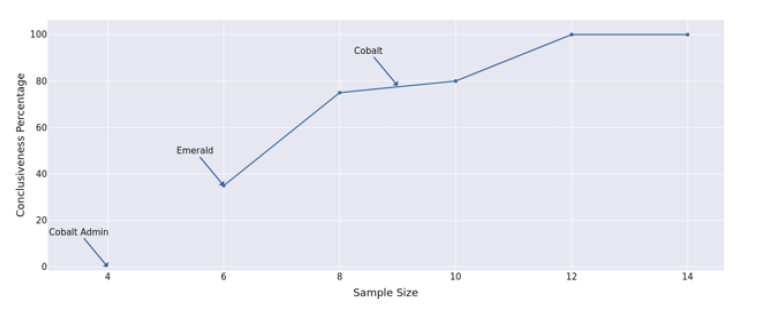
This gives 78% conclusiveness for observations on Cobalt, 35% for Emerald, and 0% for CKAN Admin. Although inconclusive for Emerald and CKAN Admin, this is plotted below along with all data points, showing a higher score (77.78) and lower SD (14.71) for Cobalt than Emerald (67.08 and 21.88 respectively). The lowest score (59.38, SD of 21.25) is for CKAN Admin, although again this is based on only 4 responses.
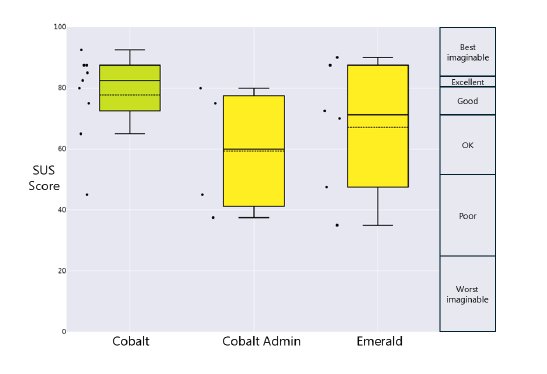
N.B. For testing purposes, CKAN Admin is referred to as Cobalt Admin. ‘Imagineable’ is a typo embedded into the SUS Analysis Toolkit.
The following table offers more detail on the usability of each system, relative to each other and various established scales:
| System | Cobalt | CKAN Admin | Emerald |
|---|---|---|---|
| SUS Score (mean) | 77.78 | 59.38 | 67.08 |
| SD | 14.71 | 21.25 | 21.88 |
| Min | 45 | 37.5 | 35 |
| Max | 92.5 | 80 | 90 |
| Adjective Scale | Good | OK | OK |
| Grade Scale | B | D | C |
| Quartile Scale | 3rd | 1st | 2nd |
| Acceptability Scale | Acceptable | Marginal | Marginal |
| NPS Scale | Passive | Detractor | Passive |
| Industry Benchmark | Above Average | Below Average | Below Average |
Despite the relative inconclusiveness, these scores do chime with opinions expressed during user testing, namely that Cobalt is preferred over Emerald, and that although CKAN Admin is preferable to the current system, it is not without flaws. Helpfully, the combined responses after Round 2 plus unmoderated responses (shown in the following sections) offer 100% conclusiveness on both Cobalt and Emerald. As described below, CKAN Admin was replaced by a new data publishing platform prototype for testing in Round 2, being Workflow Manager.
Contact
Email: auren.clarke@gov.scot